
Don’t Switch AI Tools Every Week. Learn the One You Have.
Anthropic just raised the limits. If you still hit the wall daily, it’s your CLAUDE.md: missing, or so bloated it burns tokens every turn.

👋 Welcome! I’m Daniel Williams. I write Claude Code for Non-Coders for senior technical professionals who built their careers on technical judgment, stopped writing code years ago, and are now figuring out how AI and coding agents will change their work.
The goal is to keep you as the operator, not the AI’s assistant (”reverse-centaur“), by helping you decide which tasks to automate and which require the judgment that made you valuable in the first place.
I advise clients on AI tools, strategy, and human resilience at dewilliams.co. This newsletter is where I document the patterns, commands, and operator habits that help you grow from babysitting prompts to building reliable systems.
Join 34,000+ senior technical professionals learning the operating discipline that keeps your judgment valuable.
Thursday · the setup habit that keeps you the operator, not the one paying for the model’s bad memory.
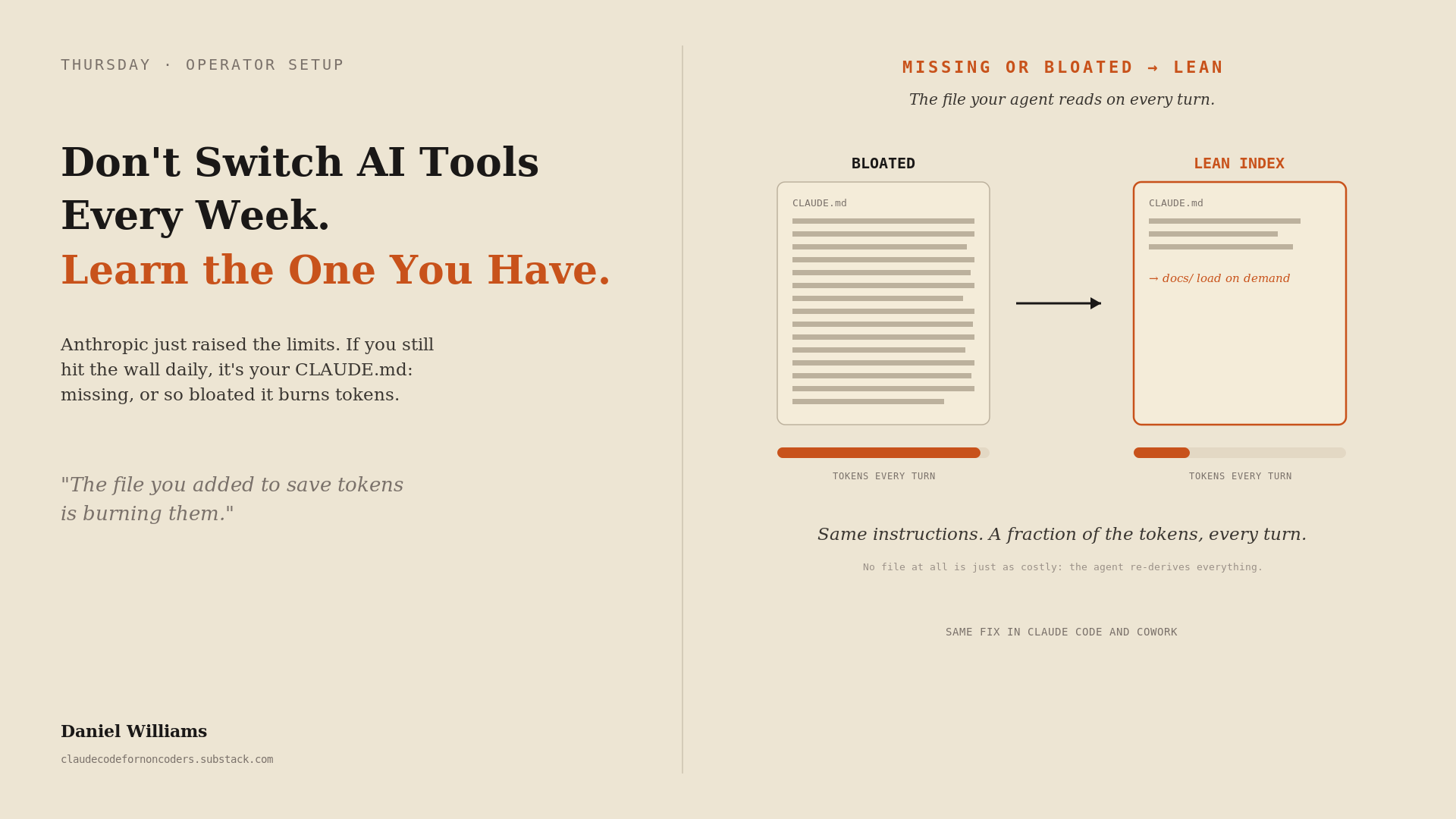
tl;dr: If you hit your usage limit frequently, the cause is almost never the price. It is your setup, and specifically one file: the CLAUDE.md that the agent reads on every turn. Most people are running with no CLAUDE.md at all, or with one that has bloated into a wall of text that burns tokens and buries the few instructions that matter. A lean version of that file, plus a couple of habits, is the difference, and it works the same whether you use Claude Code or Cowork. I have not hit a limit since November.
A friend texted me last week that she is done with Claude. It interrupts her work every day by hitting her usage limit, and she is about to move everything to Gemini. She is not the only one; I have heard the same complaint more than once lately, each time from a sharp person who is not doing anything obviously wrong.
Before you cancel anything, look at what Anthropic just did: they made the limits more generous, not less. In May, they doubled the short five-hour window on every paid plan and removed the peak-hour throttle that used to quietly cut your quota in half during busy stretches. A week later, they added another 50% to the weekly cap, a bump that runs through mid-July. If your wall got higher and you are still slamming into it every single day, the wall is not the problem. Something on your side is spending the budget faster than it should.
The first thing to understand is that it is one budget. The same allowance is shared across Cowork, the chat app, and Claude Code. Burn tokens carelessly in one, and you lose capacity in all of them. So the question is not “how do I get more limit.” It is “what is quietly emptying the tank,” and for most people the answer is the file that is supposed to prevent exactly that.
In Claude Code and Cowork, the CLAUDE.md file is a plain-text file that sits in your project, is read into the agent’s memory at the start of the work, and is referenced as it goes. This is true whether you work in Claude Code from a terminal or in Cowork without ever touching a command line: both read that same file, and setting it up well pays off identically in either, so nothing here depends on which one you use. It is where you tell the agent what this project is, how you like things done, and what to leave alone, so it stops guessing and stops asking. It is the single highest-leverage thing in your setup, which is also why it is the single most common thing people get wrong, in two opposite directions.
The first way is to have no CLAUDE.md at all. This is where my friend was. With nothing to orient it, the agent re-derives your project from scratch every session: it reads files it has read before, re-explains its own reasoning, asks you things you already answered last week, and rebuilds context you could have simply handed it. Every one of those moves costs tokens out of the shared budget, and you pay that cost again every time you start. It feels like the tool is being inefficient. It is, but you are the one who left it blindfolded.
The second way is the one almost nobody warns you about, and it is worse because it looks responsible. You add a CLAUDE.md. It helps, so you keep adding to it. Every preference, every past mistake, every edge case, every “make sure you always” gets pasted in until the file is a thousand lines of accumulated rules. Here is the trap: that file is loaded on every turn. A bloated CLAUDE.md is not a one-time setup cost. It is a tax you pay on every message you send, forever. And it does a second kind of damage that has nothing to do with tokens. When the handful of instructions that actually matter are buried in hundreds that rarely apply, the model’s attention spreads thin, and the important ones get missed, the same way the middle of a long document is where things quietly fall through. The file you built to make the agent reliable is now making it both expensive and unreliable.
I know this one because I did it to myself. The project file for this newsletter grew, as they all do, into a wall of voice rules, structural notes, and reminders, and it rode along with every request, whether the task needed it or not. So I cut it down. I shrank it to a short index that says what the project is and points to the few things that matter, and I moved the detailed material into separate documents that the agent only opens when the work actually calls for them. The instructions did not disappear; they just stopped being loaded when they were not needed. The file went from something I paid for on every single request to something so lean I stopped noticing the cost.
That is the whole fix, and the rule of thumb is simple: a good CLAUDE.md is a short index, not a warehouse. Put in the things that are true on every task, what the project is, the handful of commands or conventions you rely on, the clear “do not do this” lines, and leave out everything that is only true some of the time. The detail does not have to live in your head or in the agent’s memory every turn; it can live in other files the agent loads on demand. Lean and pointed beats long and complete, every time, because the agent reads the lean one on every turn, and you want every turn to be cheap.
You do not even have to read the file yourself to find out which problem you have. The agent can check for you. Open your project in Claude Code or Cowork and paste this:
Check my CLAUDE.md setup for this project. I don't write code, so explain in plain
language.

1. Look for a CLAUDE.md in this project, including any in subfolders.

2. Tell me what you find: none, one, or several, and roughly how long each one is.

3. Give me a plain read: is it missing, about right, or bloated, meaning a long wall
of rules that loads on every single turn?

Don't change anything yet. Just tell me where I stand.
That is the diagnosis, and most of the time, it is the whole reveal. Neither having no CLAUDE.md nor having a thousand-line one is right. Once you know where you stand, the first pass is safe to do yourself, and the agent can do it for you. Paste this:
Now help me improve my CLAUDE.md. I don’t write code, so explain each step in plain language, show me the change before you make it, and don’t touch any file until I say go.
Now help me improve my CLAUDE.md. I don't write code, so explain each step in
plain language, show me the change before you make it, and don't touch any
file until I say go.

1. If I don’t have a CLAUDE.md, draft a short one: what this project is, the few
commands or conventions that are true on every task, and any clear “don’t do this”
lines. Keep it to about a screen.

2. If mine is bloated, propose a trimmed version: a short index that keeps only what’s
true on every task, and move the rest (detailed rules, style notes, anything only
sometimes relevant) into separate files the agent opens only when the work calls for
them. Nothing gets deleted, only relocated.

3. If mine is about right, tell me the one or two lines to tighten, and leave the rest
alone.

4. Show me a before-and-after, say in plain language what you moved and why, and keep a
copy of the original so I can undo it. Then wait for my go.
That gets you to a lean, pointed file, which is most of the win: the agent reads a short index on every turn instead of a wall of rules. The deeper move, where each rule should actually live across your whole account, a single project, and individual folders, so the right guidance loads only when it is relevant, is what next Tuesday’s paid lesson takes apart, and it teaches that whole config layer by putting it to work in a real build: an agent that captures your work wins and turns them into your next performance review, Build the Agent That Tracks Your Wins and Gets You Promoted. This Thursday gets your file lean. Tuesday builds the full architecture into something you will use every week.
A few habits sit alongside the file and matter almost as much. Start fresh with brief sessions instead of dragging a giant old conversation forward, because a long history is its own bloated context you reload with every message. Use the right model for the job: I still reach for Gemini on the work it is genuinely better at, like parsing an image, a first pass at research, or a quick factual question, and I keep Claude for my primary and agentic work, where the details have to be right, and I have watched it catch errors other models confidently shipped. None of that is about using the tool less. It is about not making it carry weight it does not need to carry.
The limits will keep moving. They went up this spring, and they will change again, and none of that is yours to control. Your architecture setup is. Before you switch tools over a wall you hit every day, find out which one the wall actually is, the tool or your setup, and then go fix the file.
And this is bigger than Claude versus Gemini. There is a newer model or a shinier tool every few weeks, and the temptation, the moment yours frustrates you, is to jump. But every one of these tools rewards the same thing: learning how it actually works and setting it up to work for you. Switch before you have done that, and you do not escape the problem. You carry it to a tool you understand even less and rebuild it there from zero. The people who get the most out of AI are almost never the ones with the newest tool. They are the ones who learned the architecture of the tool they already have. The file is the smallest, fastest example of that; the habit is the whole game.
The discipline of deciding what your agent should know up front and encoding it where it belongs, rather than re-explaining it every session, is the same discipline that separates people who operate these tools from people who are operated by them. Configuration is the part of the stack you actually own; the paid deep dive on that is Stop Treating MCP as Tools. It’s Your Architecture. New here? Start with the map: Start Here: The Claude Architecture.
So before you switch, which will cost you a month of relearning, run that check first. The wall you keep hitting is almost never the one they sell you. It is the one you built, and it is the one you can fix.
Daniel Williams advises clients about AI tools, strategy, and human resilience at dewilliams.co.
Claude Code for Non-Coders publishes on Tuesdays and Thursdays. If you found this useful, share it with someone who’s about to rage-quit a tool over a wall they built themselves.
The tool-switching itch cost me a year. Every new model felt like the answer, so I never got past beginner with any one of them. The week I froze my stack and just deepened my CLAUDE.md, output doubled. Depth beats novelty. And yeah, mine was 300 lines the agent never actually read.
Good article for me, a beginner. But the paste boxes do not copy.