
Week 11: How to Avoid Agentic Context Rot
Mastering AI Context Management

This scenario will likely sound familiar: You spend valuable time feeding Claude (or ChatGPT, Grok, etc.) project details and decisions, only for it to “forget” crucial information mid-conversation, especially when conversation history gets long. For many users, this overhead can consume 10-15 minutes per session. We’ve all had this experience over the couple of years, but particularly in the last year as LLMs (large-language models) have gotten better with larger context windows. It is known as context amnesia or context rot, and feels like just as you are hitting your stride in the chat and being productive, the AI starts to give bad or even incorrect responses. It forgets information and answers that you’ve already given, creating an annoy experience.
This frustration stems from a common confusion between two fundamental concepts in agent architecture: Context and Memory. Understanding this distinction is key to transforming your workflow from tedious context management into streamlined solution engineering.
This post will clarify the difference between context and memory, describe the crucial concept of context rot, and show you how to use advanced techniques (like the concepts behind the /compact and /context commands) to manage your agent’s knowledge like a conductor leading a symphony of AI agents.
Context vs. Memory: The Crucial Distinction
While many people confuse them, context and memory play entirely separate roles in how an agent operates.
1. Context: The Agent’s Workbench (Short-Term)
Context is the informational payload dynamically assembled and managed within the LLM’s context window. It functions as the agent’s temporary workspace or workbench for a single conversation.
The LLM is fundamentally stateless outside of its training data. Its immediate reasoning and awareness are confined to the information provided within the context window of a single API call. This window refers to the maximum amount of text (measured in “tokens”) that the LLM can process and consider at any one time.
In an active session, the agent’s context (often called short-term memory or working memory) includes:
• The Conversation History (Session): The chronological, turn-by-turn record of the current dialogue.
• System Instructions: High-level directives defining the agent’s persona and rules.
• Tool Definitions: Schemas for APIs or functions the agent can use.
• The User’s Immediate Query: The question being addressed.
• Retrieved Memories: Select, relevant pieces of long-term knowledge brought in for the current turn.
2. Memory: The Agent’s Filing Cabinet (Long-Term & External)
Memory is the mechanism for long-term persistence, capturing and consolidating key information across multiple sessions to provide a continuous and personalized experience for LLM agents. It consists of extracted, meaningful information that has been condensed from conversations or external data sources.
Memory systems are typically decoupled, meaning they are stored outside of the agent’s immediate context window. The agent can only access this vast external memory using Tools or standardized protocols:
• Model Context Protocol (MCP): This protocol acts as a unified interface between the AI application and external data sources and tools. It follows a client-server architecture where a host application (like Claude Code) connects to various MCP servers. It standardizes agent-environment interactions through JSON-RPC interfaces.
• JSON-RPC (JSON Remote Procedure Call): A remote procedure call protocol using JSON format, often used by MCP servers to expose tools.
• REST (Representational State Transfer): An architectural style for networked applications, typically using standard HTTP methods for communication. REST is mentioned alongside MCP and JSON-RPC as a protocol for accessing external data.
• Streaming HTTP: A mechanism for transferring data continuously over HTTP, also used for accessing memory systems.
Memory is crucial because it persists information across distinct sessions and allows the agent to build institutional knowledge, shifting the workflow from context engineering (overhead) back to pure solution engineering.
Understanding Context Rot and Context Amnesia
In long-running chat threads on AI platforms like Claude, ChatGPT, or Grok, users frequently experience Context Amnesia and Context Rot.
• Context Amnesia: This occurs when the conversation history or the data fed to the LLM exceeds its context limit (e.g., Claude’s limit can be around 200K tokens). When this limit is hit, the older, most distant data is truncated or effectively “forgotten,” causing the AI to lose its understanding of prior interactions and decisions.
• Context Rot: This is a phenomenon where the model’s ability to pay attention to critical information diminishes as context grows, even if the hard token limit hasn’t been reached. This is often due to the positional bias of LLMs, where they perform significantly better on relevant information appearing at the beginning or end of the input, rather than the middle. Critical details buried deep in a long context might be overlooked or “forgotten” despite technically being present in the window.
Context engineering directly addresses this by using compaction techniques (like summarization or pruning) to dynamically mutate the history and preserve vital information while managing the overall token count.
Context Management Pro-Tips for Claude Code
By keeping your conversation context clean and actively utilizing your external memory, you move from constantly managing context overhead to simply focusing on the solution.
Here are two professional techniques, exemplified by common agent commands, that help you manage the trade-offs between speed, cost, and information retention:
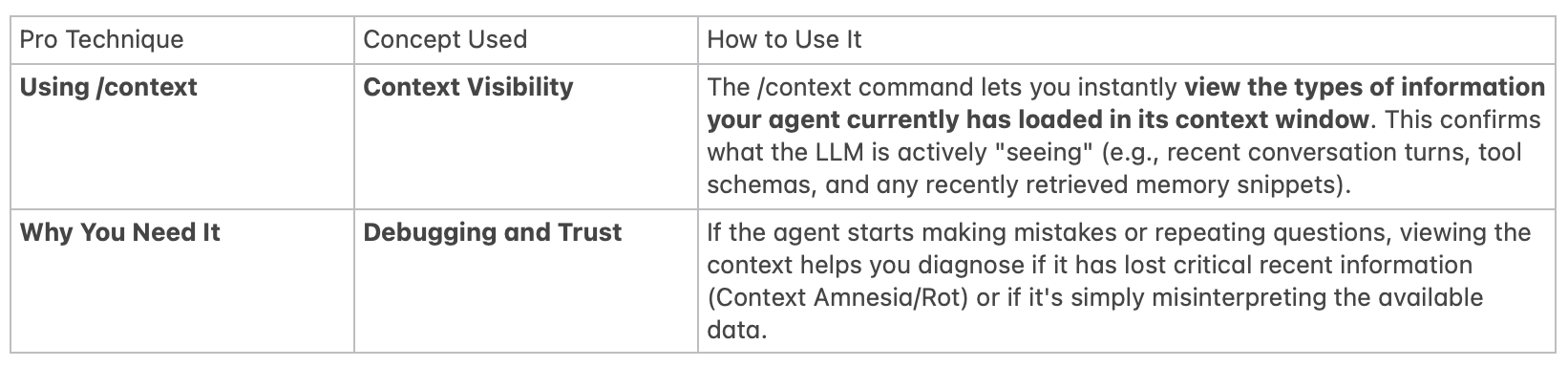
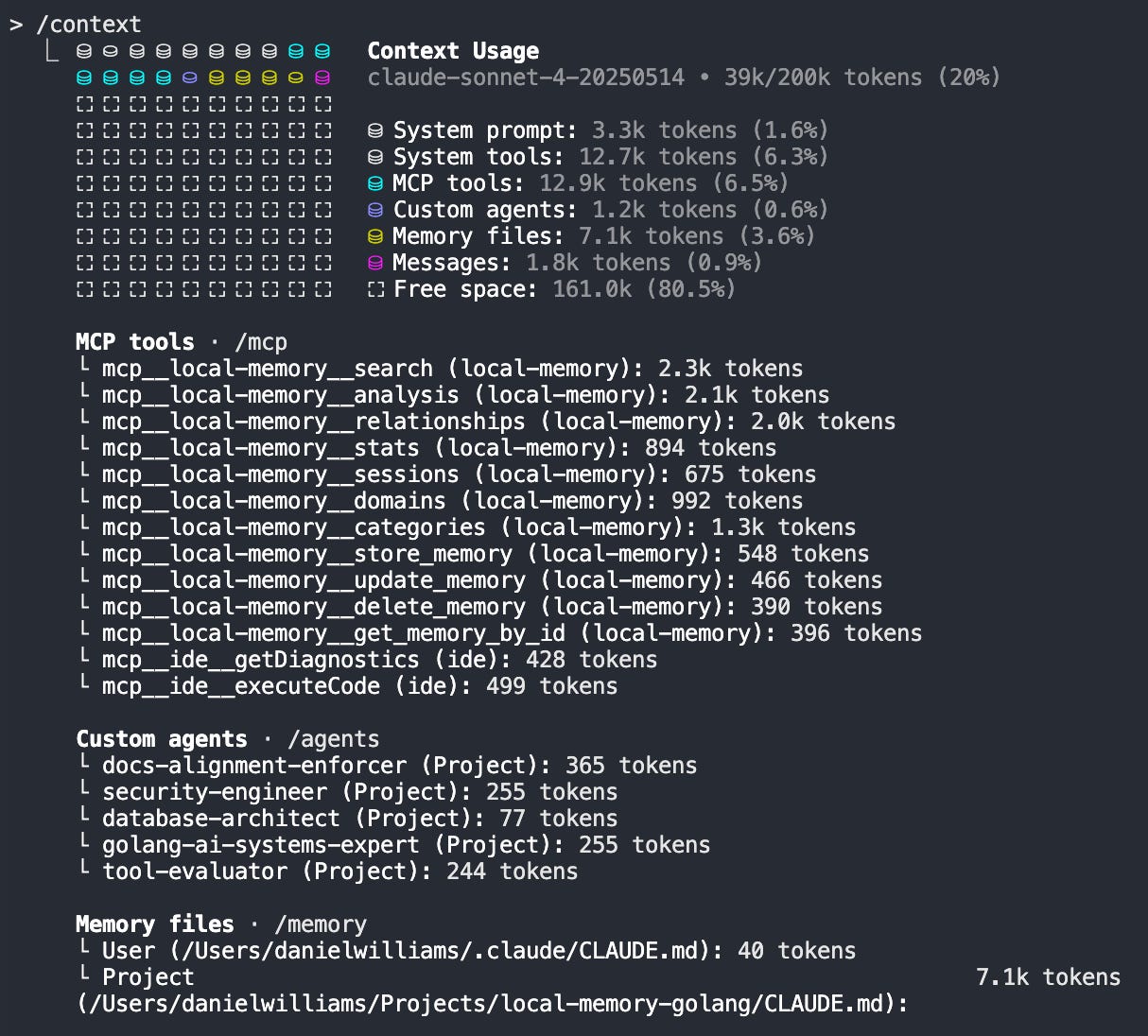
1. Mastering the /context Command (Viewing Short-Term Memory)
While tools like MCP facilitate the injection of long-term memories (like documents) into your context, the /context command in Claude Code allows you to inspect the contents of the agent’s current short-term memory.
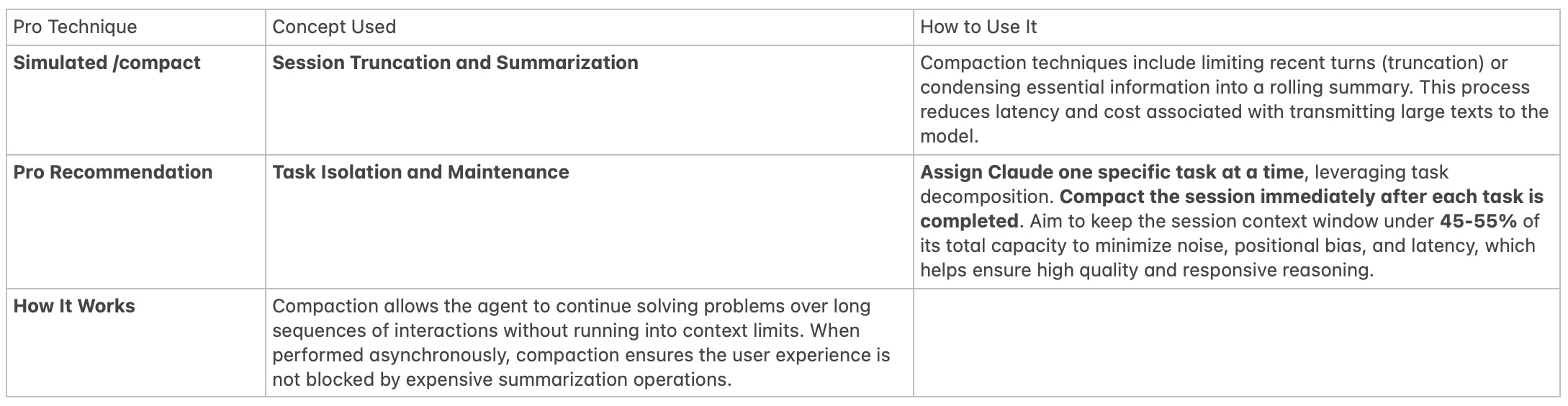
2. Mastering the /compact Command (Context Compaction)
The objective of compaction is to shrink a long session’s history by preserving vital information while reducing the overall token count.

Conclusion: Moving from Management to Wisdom
The challenge of “Context Amnesia” is a core limitation of LLMs, but it is solvable through strategic context engineering. By separating the fleeting Context (your session’s workbench) from the persistent Memory (your external filing cabinet, accessed via protocols like MCP), you move beyond simply managing tokens.
For non-coders using agents like Claude Code, thinking like a professional means adopting workflows that rely on techniques like task isolation, compaction, and viewing the current context. This shifts your approach from constant, repetitive context management overhead to direct solution engineering.
Your AI’s memory is your competitive advantage. By mastering this distinction, you equip your agent to leverage its accumulated wisdom, transforming it into the persistent, strategic technical partner you need.
The meticulous practice of Context Engineering, balancing the limited workspace (Context) with vast external knowledge (Memory), is like a skilled librarian. They don’t cram every book they own onto the desk (Context Rot). Instead, they check the card catalog (Memory) for the exact information needed for the current query, and keep the reading table (Context Window) clean, allowing the user (the LLM’s reasoning engine) to focus exclusively on the relevant, high-quality material.